Skip to contentK.(mufasa)
Menu
← All projects

V2 · Stellar Testnet · pre-launch

Split

Split helps groups collect equal contributions and see who has paid. V2 connects a simpler creation and payment experience to wallet-signed transfers on Stellar Testnet.

Solo software engineer · built from scratch

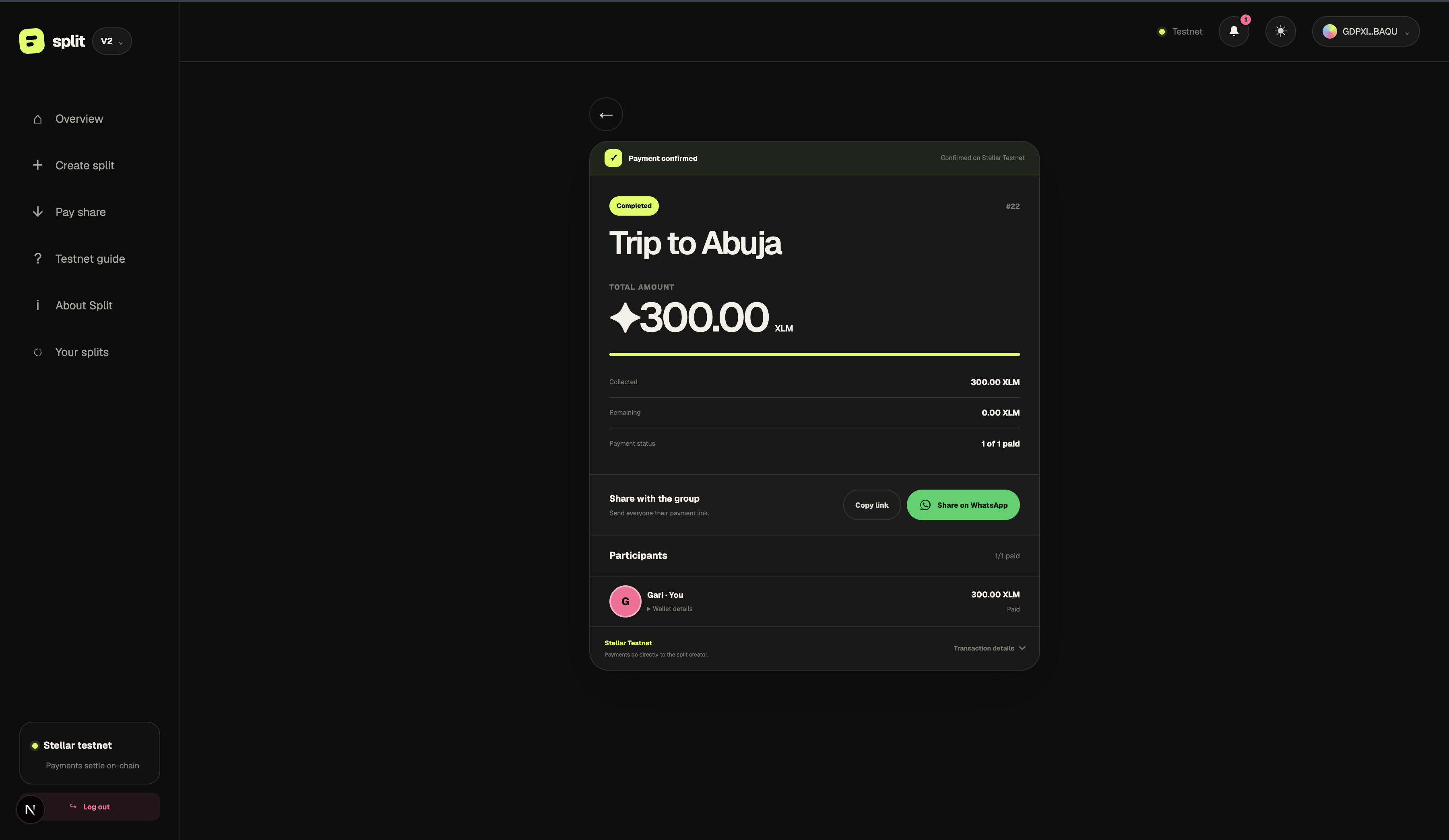
Split V2 completed Trip to Abuja collection showing a confirmed payment, 300 XLM collected and the participant marked Paid.
The current experience · A completed V2 Testnet collection. Split #22 is the payment example; the creation walkthrough below uses Split #21.Open full size ↗

The product journey

  1. 01The payment chase
  2. 02V1: prove the flow
  3. 03Listen & review
  4. 04Redesign for V2
  5. 05Validate & refine

01 / The inspiration

I built Split from scratch, owning the product design, frontend, smart contracts, event indexing, and wallet integration. Wallet providers supply account access and signing; Stellar provides the transaction network.

Split starts with a familiar problem: a group organizes rent, dinner, dues, or an event in a chat, then the creator chases payment screenshots and maintains a manual checklist. I wanted one shared record that makes the amount, participants, and payment status understandable.

The product stays focused on collecting equal contributions. Payments move directly from participants to the creator, while Stellar contract state records who has paid. V2 builds on that foundation with a more approachable interface and embedded onboarding.

02 / What V1 established

V1 connected collection creation, sharing, wallet-signed payments, paid and pending status, and indexed transaction receipts. It proved the core product workflow on Stellar Testnet and provided a stable baseline for the redesign.

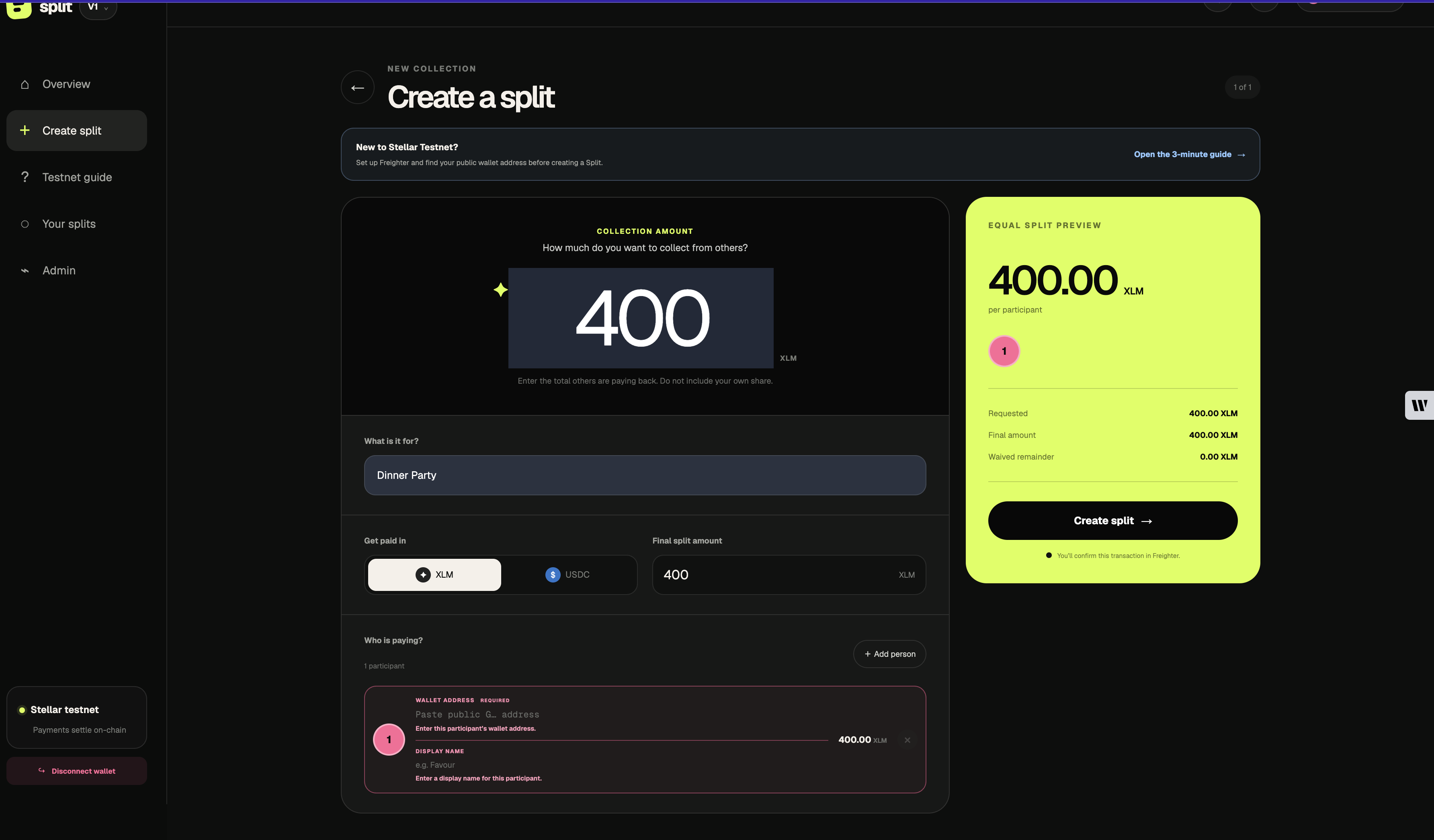
The interface still asked users to handle wallet setup and technical concepts early. A long creation form and competing payment panels made a working system harder to understand. The archived screens below show the starting point, rather than the current V2 interface.

Split V1 long creation form with amount preview and missing participant detail errors.
Before · V1 creation. Amount, participants, validation, and allocation are presented together in one long form.Open full size ↗
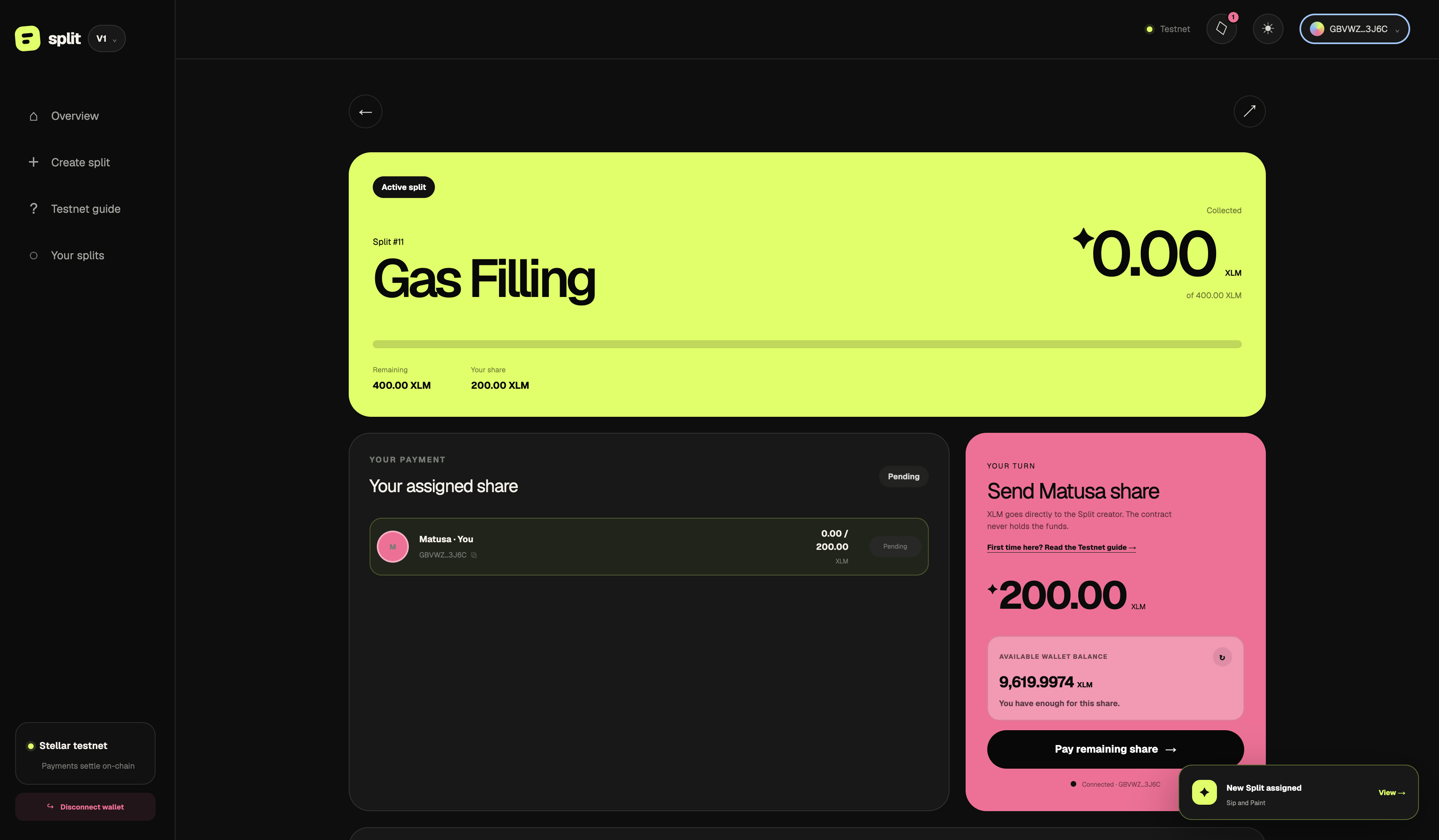
Split V1 participant payment view with the share, balance, progress and payment action spread across panels.
Before · V1 payment view. The assigned share and next action compete with several large information panels. Testnet example.Open full size ↗

03 / Listening before redesigning

In a live review with UX professional PV, the central recommendation was to remove distractions: explain the outcome plainly, let a disconnected visitor start creating a Split, and introduce wallet connection when identity is needed. We discussed familiar payment-product patterns and a receipt-like view of purpose, amount, people, and payment status. These recommendations informed V2’s action-first entry, staged creation, and receipt hierarchy.

Tester feedback exposed a separate trust problem: one respondent saw a successful transaction on the explorer while Split still showed the payment as pending. Others reported confusing wallet setup, unclear participant-address entry, missing balance information, and errors far from the action that caused them. Reports also covered wallet disconnection, activity-history loading, and a crash when reopening a collection route.

This made V2 more than a visual redesign. The work needed to address task clarity, wallet control, and trustworthy payment feedback. The captures below show changes to creation and payment presentation; confirming that the reported reliability and recovery issues are resolved requires separate regression evidence.

04 / How V2 responds

V2 puts the payment task first: begin creating a Split, authenticate when the action needs an identity, review the details, then approve the transaction. Addresses remain authoritative for assignment, while readable names help people scan payment status.

The captured creation flow separates purpose and amount, participant entry, final review, and transaction approval. The participant screen brings the amount owed and Pay your share into one view. These screens demonstrate the implemented hierarchy; whether people complete the task more easily still needs follow-up testing.

The access model distinguishes a disconnected wallet, a connected but unassigned wallet, and an assigned participant or creator. Gating the interface helps avoid exposing unrelated payment details in the app; it does not make the blockchain private. Titles, names, and payment records remain queryable through the current contract. Actual data privacy would require a separate storage or contract redesign.

Entry

V1 · Baseline

Wallet setup and an empty dashboard appear before the payment task.

V2 · Documented decisions

Lead with Create a split; introduce authentication when the task needs it.

Why: Let people understand the product before handling wallet setup.

Onboarding

V1 · Baseline

Install Freighter, select Testnet, fund the account, then return to Split.

V2 · Documented decisions

An embedded sign-in path, with Freighter retained for existing-wallet users.

Why: Remove the extension requirement while preserving wallet choice.

Creation

V1 · Baseline

Amount, asset, participants, and allocation share one long form.

V2 · Documented decisions

Separate purpose and amount, participant entry, and final review.

Why: Make each decision clear and expose exact identities before signing.

Payment view

V1 · Baseline

Personal share, group progress, balance, and proof compete across panels.

V2 · Documented decisions

Bring the personal share, payment action, and participant status into a receipt view.

Why: Keep the payment task prominent and verification available on demand.

The architectural change

V1

Interface → Freighter-specific signing

V2 · Local integration documented

Interface → Split wallet adapter → Blux or Freighter

Transaction construction, simulation, submission, and confirmation stay in Split’s transaction service. Providers supply identity and signing through a shared boundary.

Documented design and implementation changes. Follow-up usability testing will evaluate their effect on task completion.

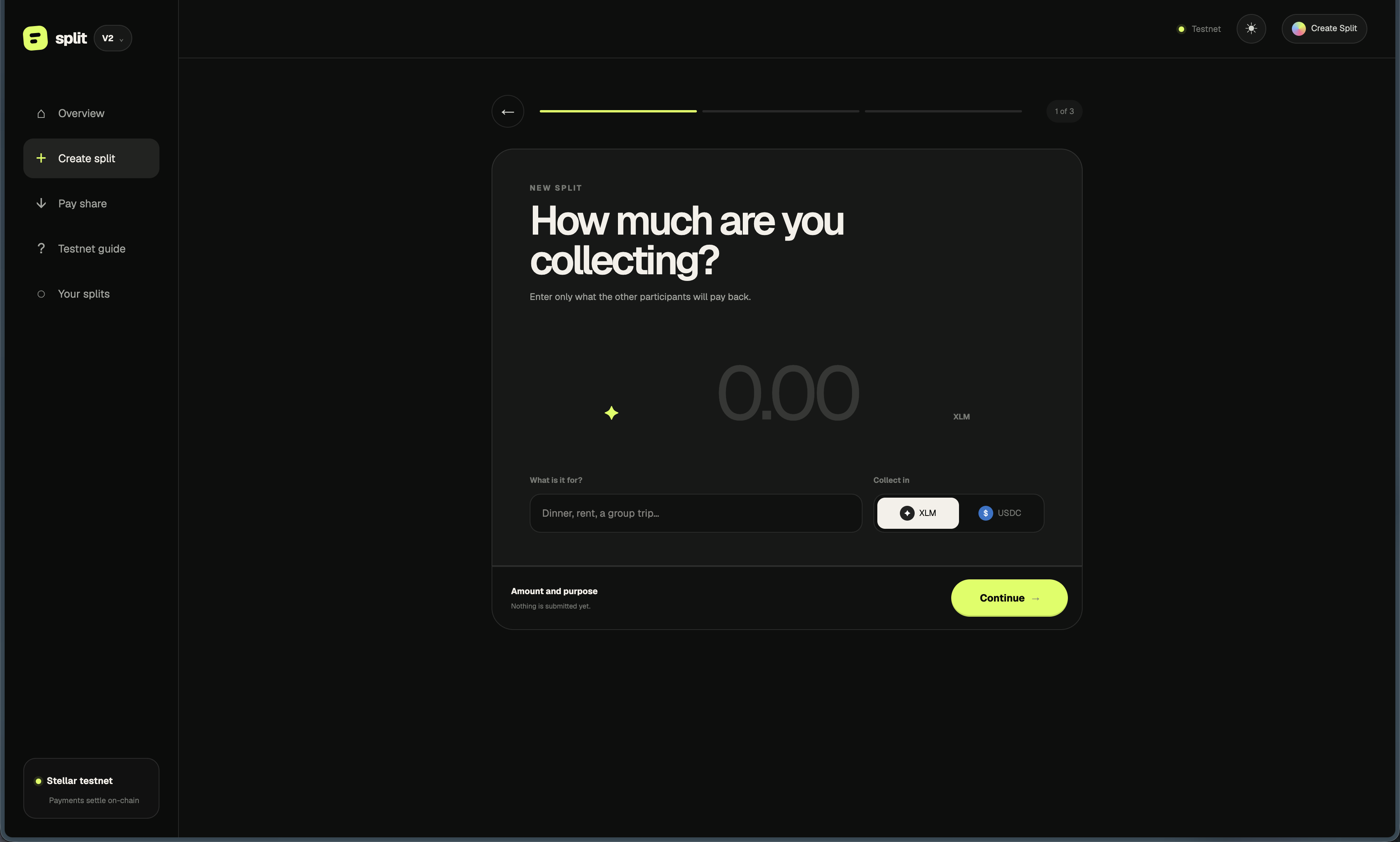
Split V2 first creation step asking for collection amount, purpose and asset.
V2 · Start with amount and purpose. Capture from 3 October testing; no transaction is submitted at this step.Open full size ↗
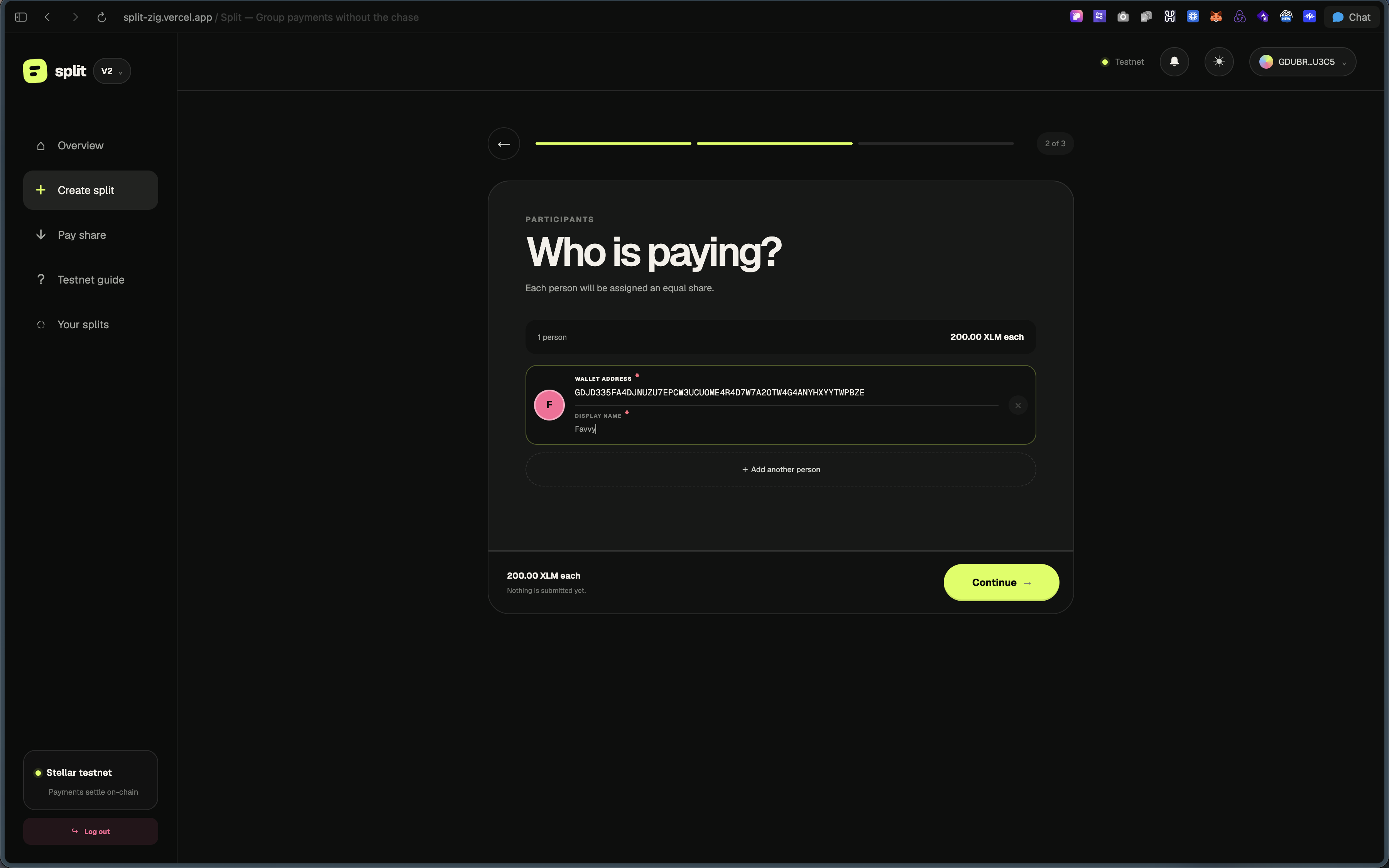
Split V2 participant entry step with wallet address, display name and equal-share preview.
V2 · Add people. Wallet addresses determine assignment; display names support recognition. Testnet example.Open full size ↗
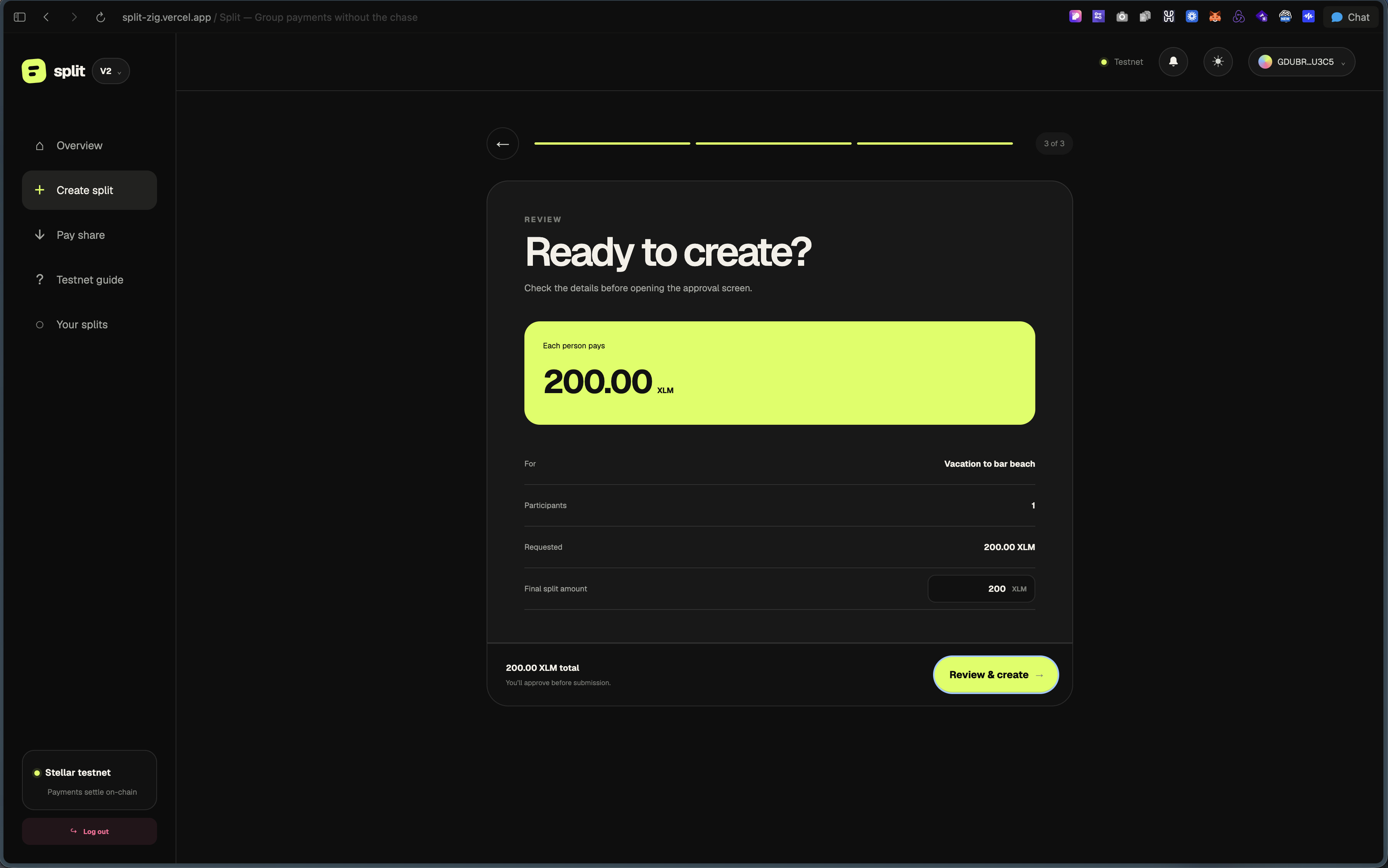
Split V2 final creation review showing the purpose, requested amount and participant share.
V2 · Review the collection before opening transaction approval. This is a preview, not a confirmed creation.Open full size ↗
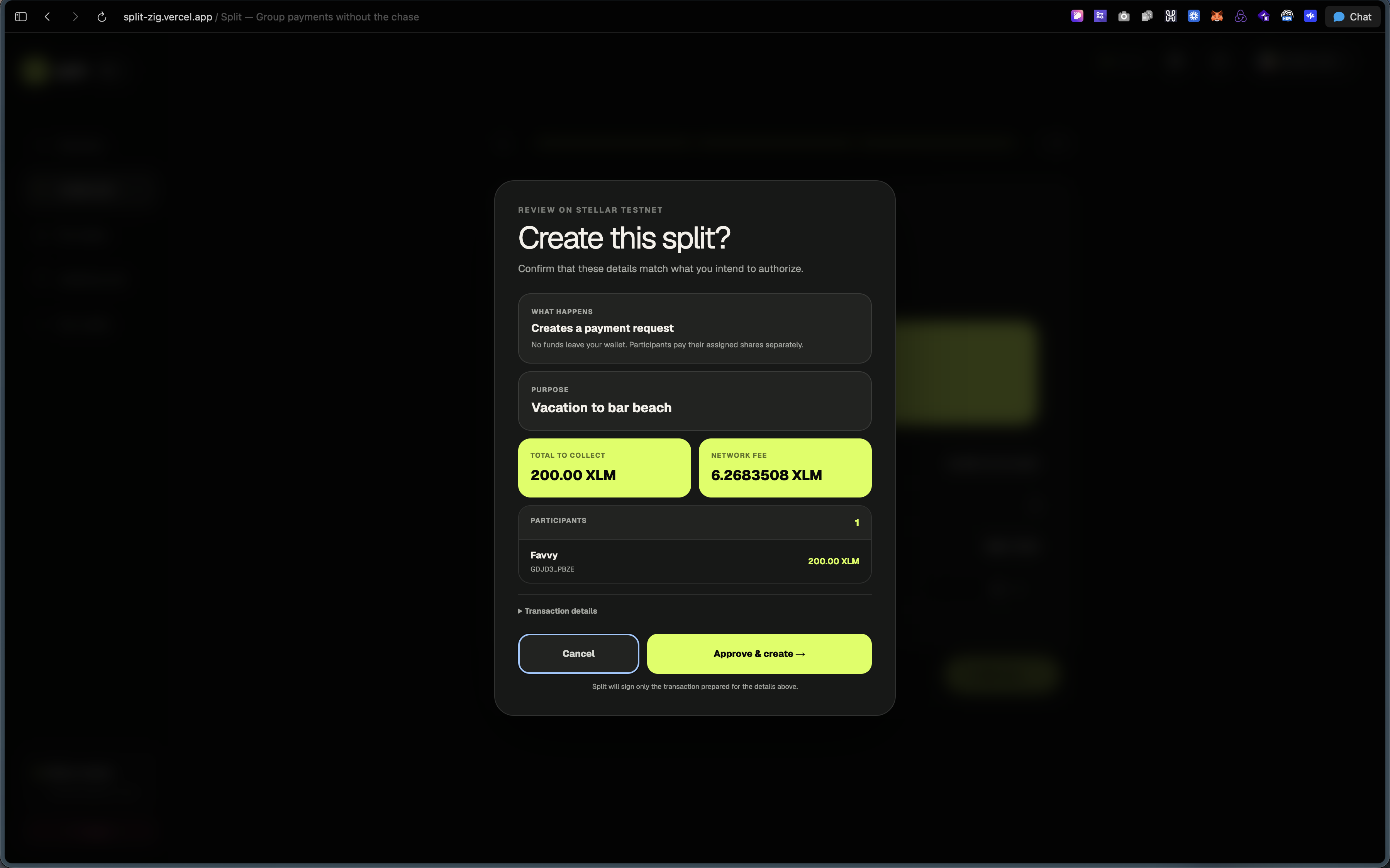
Split V2 approval modal showing the collection purpose, total, network fee and participant before signing.
V2 · Approve deliberately. The purpose, amount, network fee and participant are visible before signing.Open full size ↗
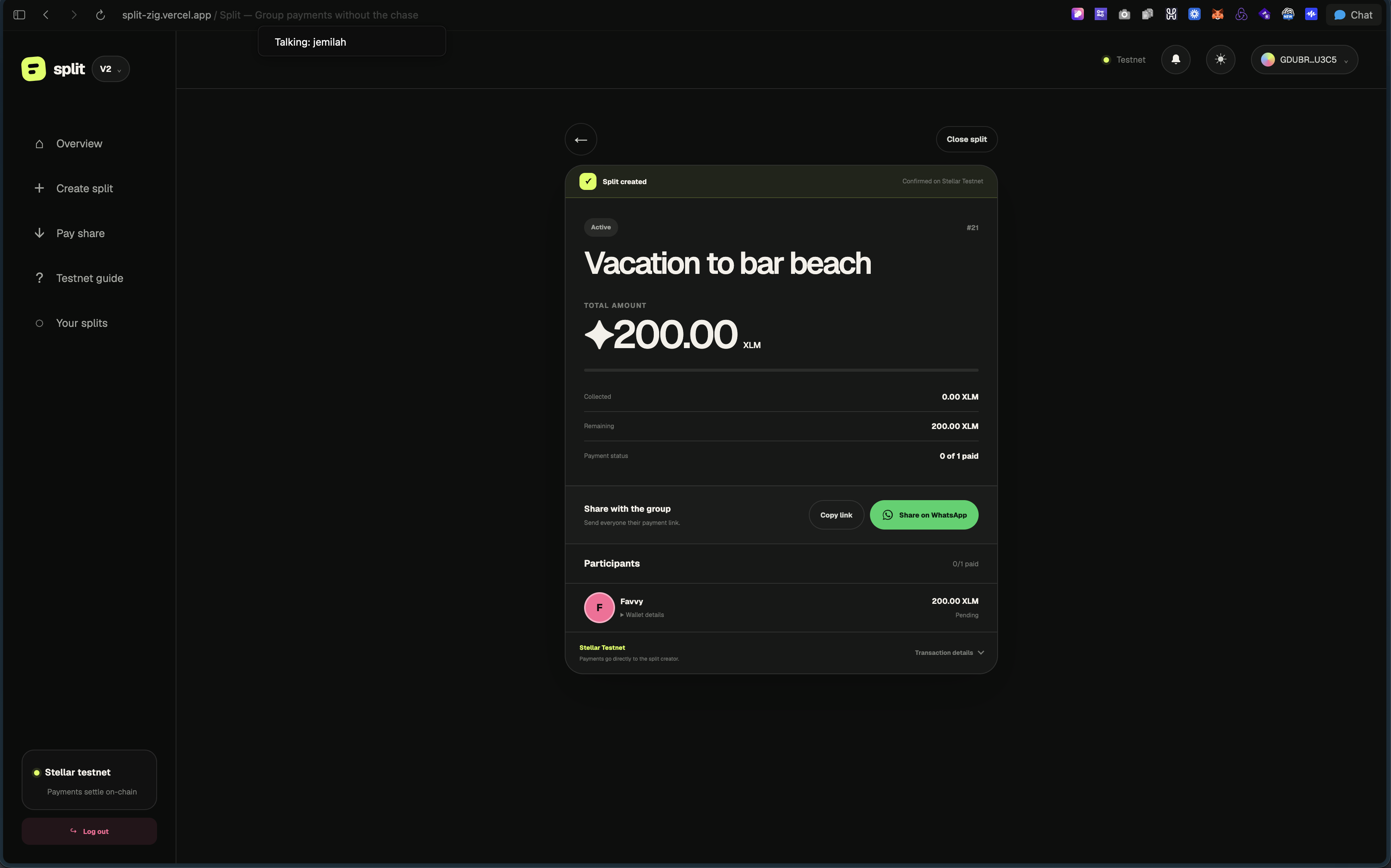
Split V2 creator view reporting collection 21 created on Stellar Testnet, with sharing controls and no participant payment yet.
V2 · Creation confirmed in the app. Sharing becomes the next step; the collection still has no paid participants.Open full size ↗
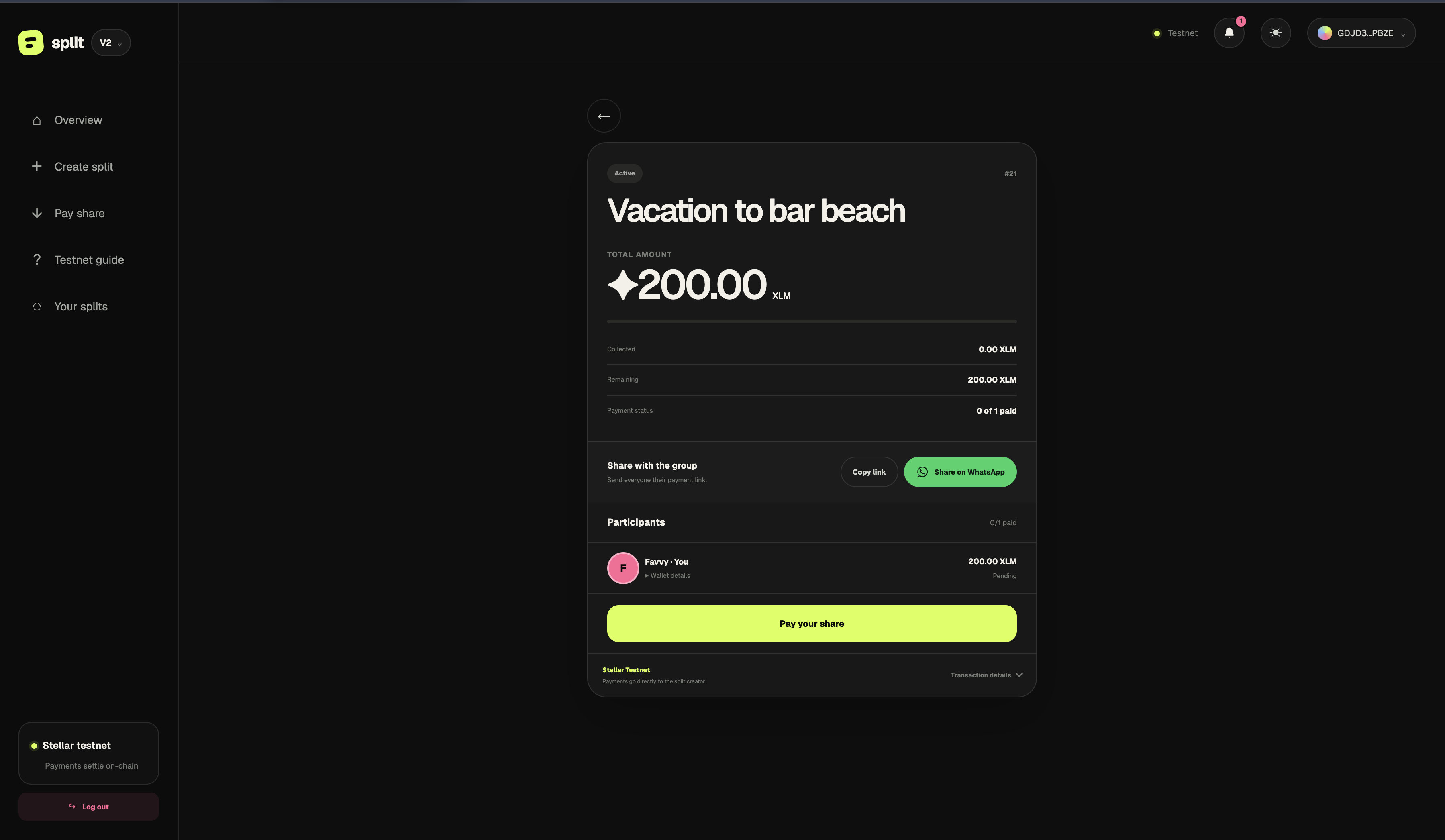
Split V2 assigned participant view showing a pending 200 XLM share and Pay your share button.
V2 · Assigned participant view for Split #21. The share is pending and the payment action is visible.Open full size ↗

05 / Engineering the new experience

Removing the extension requirement also required an architectural change. Instead of importing one wallet provider throughout the product, V2 introduces a Split-owned adapter for session and signing behavior. Blux is the embedded Testnet path; Freighter remains available for existing-wallet users.

Split validates, constructs, and simulates the transaction; the wallet provider supplies the signature. Split then submits the signed transaction and waits for confirmation before presenting the result. Keeping this lifecycle in the application preserves a shared transaction path across wallet providers.

The Soroban contract continues to validate participants, shares, payment state, and creator-only closure. Supabase indexes events and transaction hashes for durable receipts; the contract remains the source of payment state.

The report of explorer success alongside a pending app status makes consistency a user-facing requirement: submission, confirmation, contract reads, and indexed activity must remain distinguishable. A successful payment capture demonstrates that example’s result; it does not establish that delayed indexing, refresh, and interrupted sessions always recover correctly.

Early October testing encountered a Blux HTTP 400 signing failure when decoding Soroban transaction data with extension version 1, plus a separate passkey sign-in failure. An outdated backend XDR schema was the compatibility hypothesis. Later captures show creation confirmation for Split #21 and a successful payment state for Split #22. These are separate Testnet examples. The exact fix remains undocumented; recovery and full wallet regression still need validation.
V2 application & evidence flow
  1. 01

    Split interface

    Create, share, and inspect payment state

  2. 02

    Transaction service + wallet adapter

    Split builds and simulates; Blux or Freighter signs; Split submits and confirms

  3. 03

    Soroban contract

    Validate shares and record payments

  4. 04

    Supabase indexer

    Persist events and transaction receipts

Funds move separately

Participant Creator

The contract invokes a direct token transfer. It tracks the payment without holding participant funds. Indexed history supports receipts; the contract remains the source of payment state.

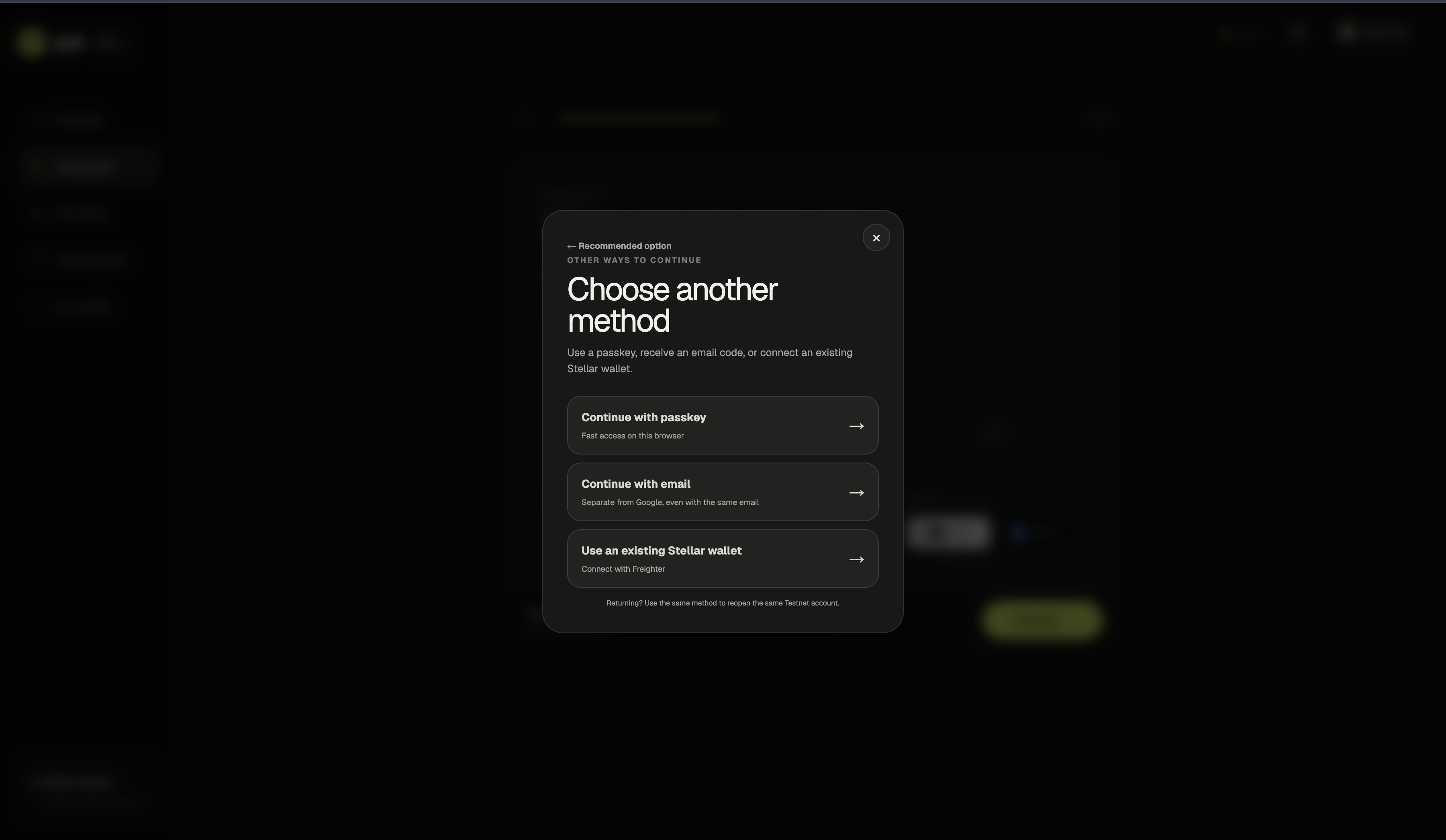
Split V2 authentication dialog offering passkey, email code and an existing Stellar wallet through Freighter.
V2 · Wallet choice in context. Available sign-in options are shown; this capture does not verify their recovery or signing behavior.Open full size ↗

06 / Where the product is now

V2 brings the same focused payment workflow into a clearer experience, with embedded onboarding, wallet choice, transaction review, and session restoration. It remains pre-launch on Stellar Testnet; follow-up task testing will establish whether the redesign makes creation and payment easier to complete.

The roadmap calls for comparing V1 and V2 on the same tasks: create a Split, add participants, identify the amount owed, pay, and locate the receipt. Completion, onboarding abandonment, address errors, time to understand status, and requests for assistance are proposed measurements, not reported results.

Before moving beyond Testnet, wallet recovery, same-wallet re-login, cross-wallet payments, and interrupted signing need deliberate validation against the current integration. Earlier roadmap notes describe recovery limitations in a previous SDK version; those notes are historical evidence, rather than verified behavior of the current build.

Explore more work